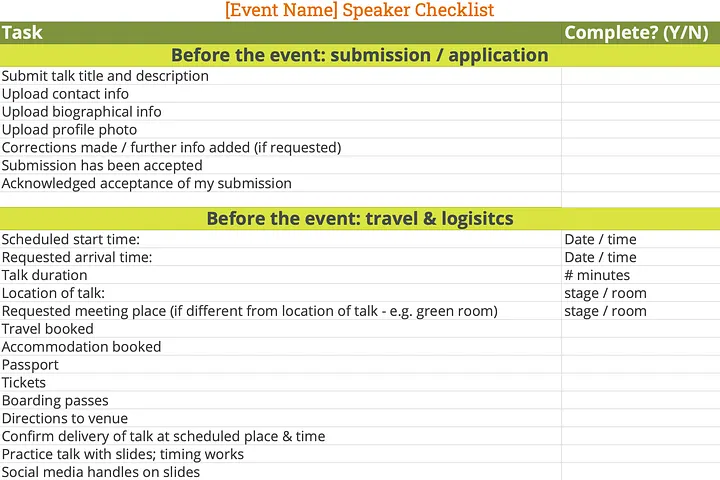
Who is the speaker checklist really for?
Ultimately the checklist is obviously for use by speakers: they’re the ones putting themselves out there, putting their reputation on the line and getting up on stage in front of people.
But conference planners and exhibition organisers also have a big interest in helping their speakers to self-organise…
Speakers who arrive prepared and organised are more relaxed, which means less stress for the on-the-day team. Those few minutes before a speaker gets on stage can be nerve-wracking enough, without a frantic last minute search for a MacBook video adaptor.
By creating a detailed speaker checklist for your event, you can head off a lot of questions from speakers. This frees up your time for strategic tasks that add value, and for handling the the million-and-one other things that need doing in the run up to an event.
You can also use the checklist as a way to suggest things like rehearsing their talk so their content is better prepared and they give their best possible performance. This translates into a better quality event, which in turn translates into higher attendee satisfaction and return rate for subsequent events.
So, what to include in a speaker checklist, and why?
Here’s a high level look. For more detail, download the template at the bottom of the page…
Practicalities. The main point of including these are to encourage your speakers to self-organise as much as possible, answer FAQs early and avoid a last-minute rush of queries and requests:
- Where and when the talk will take place
- Where and when to arrive to get mic’d up, inducted in the use of AV equipment
- How slides will be managed (uploaded prior to event? bring your own laptop?)
- A reminder to sign & return their speaker agreement , if you’re using them.
- etc.
Content. Use your checklist to encourage speakers to put the time in to preparing high quality content:
- Has the speaker rehearsed their talk? Many speakers (the author included) tend to be hopelessly optimistic about how much material we can cover in a limited amount of time. This can lead to rushing through the material
- Does your event have any slide formatting requirements (e.g. slides must carry the event logo or use a slide template?). If so, it’s worth adding these to the checklist to highlight it.
Promotion. Use the checklist to suggest ways that speakers can promote your event for you:
- Before the event: Suggest that speakers tell their networks that they’ll be speaking at your event. This can extend the reach of your marketing efforts and raise your event’s profile in unique ways, and to new audiences — especially if you bring in high-profile keynote speakers.
- During the event: encourage speakers to live tweet/post that they’re at your event and will be speaking soon. It all helps to add to the event’s buzz.
- If you have filmed or taken photos during their talk, this is all potentially high quality content that they can use to promote themselves/their work/their business. In doing so, they will be promoting your event in the process. Encourage them to do it.
Speaker checklist template for download
Feel free to download our Speaker Checklist template to adapt for your own event. And if you have any suggested items, please do share them with us!
Lineup Ninja offers speaker management software for exhibitions and conferences. We help event organisers save hours of tedious work by automating many of the repetitive, time-consuming tasks associated with coordinating event content. Sign up for a free trial to see how we can help you.