If you’re an event organiser or marketer, and want to get more attendees while saving countless hours of admin, you now have the perfect pair of products to help: Gleanin and Lineup Ninja.
Gleanin gives you the tools you need to cut through the digital noise and create sell-out events. The community marketing platform arms you with a suite of time-saving word-of-mouth tools to help you reach more attendees and convert them.
Lineup Ninja saves you days of admin by automating many routine tasks, and it saves you sleepless nights by keeping all your data under control. The speaker management tools help you manage speaker invitations, submission & review, agenda scheduling and publishing in less time and more accurately.
Because both products use the same speaker data, bringing them together means less manual copying, exporting and importing of data, and fewer spreadsheets floating around. It also means there’s a ‘single source of truth’, so you no longer need to worry about which version of the data can be trusted.
Tamar Beck, CEO at Gleanin commented:
“Every event organiser knows the pain of keeping event content up to date. Whether it’s spreadsheets, websites, apps or any other marketing materials — maintaining this content is a huge time drain. That’s why we’re delighted to have an integration with Lineup Ninja. It removes all the manual steps relating to the creation of personalised speaker promotion images and automatically updates these images if and when changes need to be made. Ensuring that when speakers promote their participation in an event it’s easy AND accurate! Together, Lineup Ninja and Gleanin are saving event marketers heaps of time.”
How it works
Speaker and session information is gathered via Lineup Ninja. This is usually captured directly from the speaker via a submission form, but it could be added by an editorial team or the event content manager: or a combination of all three.
Once the speaker and session data has been collected and the sessions have been scheduled (using Lineup Ninja’s ‘Smart Agenda Planning’ technology), it can be published to the show website and Gleanin.
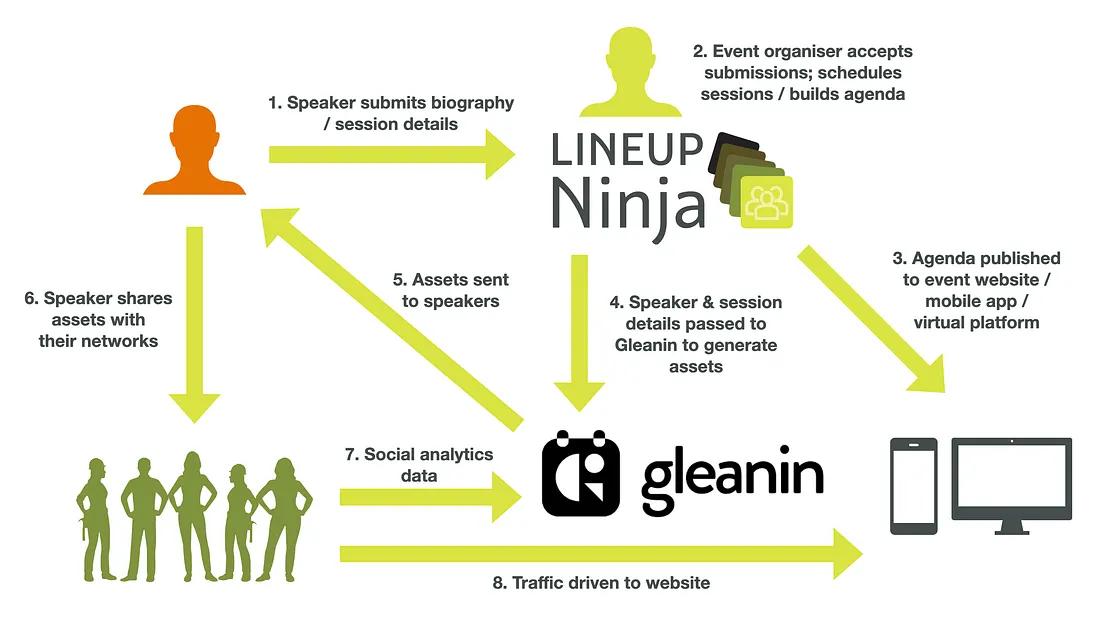
Gleanin generates speaker assets that can include the following: a background image with the show branding, speaker name, company, photo, and the session title, time and date.

Speakers are sent a link to their assets page, where they can choose an image and a social network to share it on:
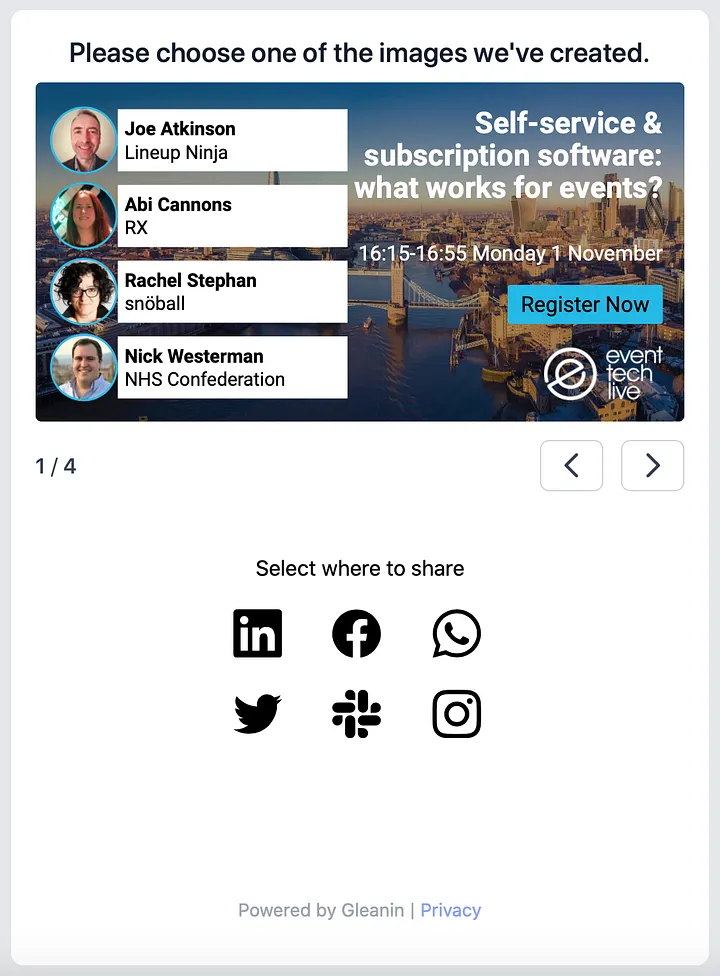
The images can contain a link to the event registration page and a tracking code so you can measure the performance of your campaigns.
Joe Atkinson, Co-founder at Lineup Ninja commented:
“Event organisers’ time is really precious. The last thing you need is to waste it copying data from one system to another. With this integration, you can capture all your speakers’ data in Lineup Ninja, then push it straight into Gleanin to generate the speaker assets, saving a ton of time. It also means less chance for human error to creep in, like uploading an out-of-date version of the spreadsheet etc.”
Success for Event Tech Live
The integration was commissioned by Event Tech Live for their 2021 show in London. Adam Parry, Co-founder at Event Tech Live explained:
“We’ve used both Lineup Ninja and Gleanin across a number of our shows now and both products save us both time and money. But, copying data between them and keeping them in sync was a pain so we asked them to build an integration. Now instead of repeatedly exporting and importing spreadsheets by hand, once the initial set-up is done, you can just sync them at the click of a button. It’s a huge time saver.”
Find Out More
To find out more, book a demo with Lineup Ninja or Gleanin .